



You’ve seen the promises. “Automate your work!” “Save hours every week!” “No coding experience needed!” Python automation courses sound almost too good. Before investing time and money, you want the real story — not marketing, but what actually happens when you take one.
This is that honest look. What you’ll learn, what the experience feels like week by week, what realistic outcomes look like, and how to determine if a Python automation course fits your situation. Whether you’re in Toronto, Vancouver, or anywhere else, these insights apply — though local learners can find region-specific guidance in this Toronto Python course overview.
What Python Automation Courses Actually Cover
Quality automation courses share common curriculum elements, though depth and approach vary:
Foundation: Python Basics (Usually Weeks 1-3)
Every course starts here, even those claiming “no experience needed.” You’ll learn:
Core concepts: Variables (storing information), data types (text, numbers, lists), basic operations. This is the vocabulary of Python — you can’t skip it.
Control structures: If statements (making decisions), loops (repeating actions). These transform static scripts into dynamic automations that respond to different situations.
Functions: Organizing code into reusable pieces. Critical for building maintainable automations rather than messy one-off scripts.
File basics: Reading from and writing to files. Nearly every automation involves files somehow.
The reality: This phase can feel slow if you’re eager to automate. It’s also where most dropouts happen. The concepts seem abstract until you apply them — which comes next.
Core Automation: Practical Applications (Weeks 4-8)
Here’s where courses diverge from general Python training:
Excel/spreadsheet automation: Reading data from spreadsheets, manipulating it programmatically, writing formatted output. For most business users, this alone justifies the course.
File management: Organizing files automatically, renaming batches, moving documents based on rules, processing entire folders. Eliminates tedious manual file handling.
Data cleaning and transformation: Handling messy real-world data. Removing duplicates, fixing formats, standardizing entries. Usually involves the pandas library.
Basic web interaction: Pulling data from websites, making API requests. Extends automation beyond your local files to external data sources.
The reality: This phase feels rewarding. You build things that work, that save time, that solve real problems. Motivation typically rebounds here.
Advanced Topics (Weeks 9-12+)
Better courses extend into more sophisticated automation:
Email automation: Sending automated emails, processing incoming messages, building notification systems.
Browser automation: Controlling web browsers programmatically for testing or data collection from complex sites.
Scheduling: Running automations without manual triggering — overnight processing, regular data collection, scheduled reports.
Error handling: Building automations that fail gracefully when unexpected situations occur.
The reality: Not everyone needs these topics. Good courses make them available without requiring them for completion.
The Week-by-Week Experience
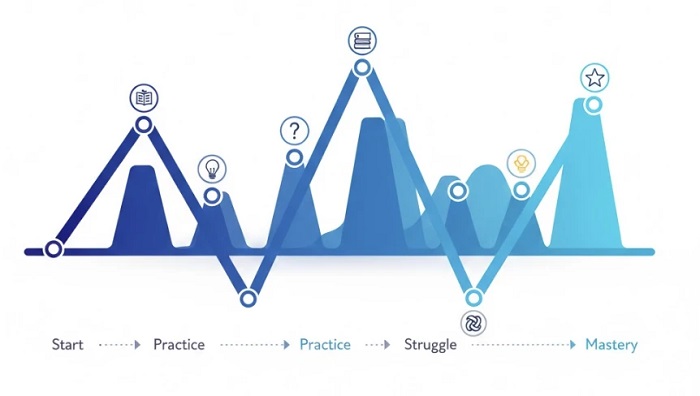
Knowing what to expect emotionally helps you persist through challenging phases:
Week 1: Excitement mixed with uncertainty. Setup frustrations possible. First “Hello World” feels like achievement. Concepts seem manageable.
Week 2-3: Difficulty increases. Loops and logic require new thinking patterns. “Am I getting this?” doubts emerge. This is the danger zone for quitting.
Week 4-5: First real automation works. You load your actual data, process it, output results. “This is actually useful” realization. Motivation surges.
Week 6-8: Building competence. Each project comes easier than the last. You start seeing automation opportunities everywhere. “I could script that” becomes reflexive.
Week 9+: Increasing independence. You solve new problems by adapting what you’ve learned. The course becomes a reference rather than a guide.
What You Actually Get Out of It
Realistic outcomes from completing a Python automation course:
Immediate Benefits
Working automations: Scripts that handle your repetitive tasks. File organizers, report generators, data cleaners — tools you use immediately.
Time savings: Hours reclaimed weekly from tasks now handled by code. The ROI calculation is straightforward: if automation saves 5 hours monthly and took 40 hours to learn, breakeven happens in 8 months. Every month after is pure gain.
New problem-solving lens: You start seeing manual processes differently. “This could be automated” becomes a natural thought pattern.
Longer-Term Benefits
Career enhancement: Python automation skills appear in job postings across industries. You become more valuable in your current role and more attractive for future opportunities.
Foundation for growth: Automation is often a gateway. Some learners progress to data analysis, others to software development, others to more sophisticated automation engineering.
Compound returns: Each automation you build saves time that can be invested in learning more. Skills accumulate; benefits multiply.
What You Don’t Get
Honest limitations:
Not instant expertise. Course completion means competent beginner, not expert. Real expertise comes from months of applying skills to varied problems.
Not automatic job offers. Skills help careers, but courses alone don’t guarantee employment. You still need to demonstrate value to employers.
Not effortless mastery. Learning requires genuine effort. “Easy” courses often mean shallow courses. Real capability comes from real work.
Signs a Python Automation Course Is Right for You
Consider a course if:
You have repetitive data tasks. Weekly reports, monthly file processing, regular data cleaning. Recurring tasks create recurring returns on automation investment.
You’re willing to invest 8-12 weeks. Not just calendar time — actual learning time. 5-10 hours weekly for 2-3 months. Less than that, and completion becomes unlikely.
You accept initial struggle. The first weeks feel awkward. Concepts take time to click. If you expect immediate ease, frustration awaits.
You have specific problems to solve. Vague interest in “learning Python” fades. Specific tasks you want to automate provide motivation that sustains effort.
Signs a Course Might Not Be Right (Yet)

Reconsider or wait if:
You have no repetitive tasks. Automation solves repetition. Without it, you’re learning solutions for problems you don’t have.
You can’t commit consistent time. Sporadic learning means constant re-learning. Better to wait until you can maintain regular practice.
You expect overnight transformation. Courses teach skills, not magic. Capability builds over weeks, not days.
You’re only interested because it’s trendy. External motivation fades when difficulty appears. Internal motivation — solving your own problems — persists.
What to Look for in a Course
If you decide a course fits, evaluation criteria:
Practical focus. Projects should resemble real work tasks. File automation, Excel processing, data handling — not abstract programming exercises.
Appropriate assumptions. “Beginner-friendly” should mean genuinely beginner-friendly. Courses that assume knowledge while claiming not to create frustration.
Clear progression. Curriculum should build logically. Each module prepares for the next. Random topic collections indicate poor design.
Hands-on emphasis. You should write code throughout, not just watch someone else code. Active practice beats passive observation.
Realistic promises. Courses promising mastery in days or guaranteed jobs are overselling. Quality courses promise skills and practice, not miracles.
The Decision Point
Python automation courses deliver genuine value — but only for people in the right situation with realistic expectations. They won’t transform your career overnight. They won’t make you a senior developer in weeks. They won’t automate tasks you don’t have.
What they will do: give you a structured path from knowing nothing about Python to building working automations that save real time. That’s a meaningful outcome for the right person.
The question isn’t whether Python automation courses work. They do, for those who complete them with effort. The question is whether you’re ready to be one of those people.
If the answer is yes, and you want a course designed specifically for practical workplace automation, the LearnForge Python Automation Course teaches exactly these skills — from absolute zero through building real automations you’ll actually use.